
Surveys give you an opportunity to share feedback about your experience at work. Your responses help your organization understand what’s working well and where improvements may be needed.
Starting a survey
When you’re invited to participate in a survey, you’ll receive a notification in Notifications. Depending on your Organization’s survey settings, you may also receive an email invitation.
To start a survey, open your Discovery page. A survey activity tile appears at the top of the page, above your feed.
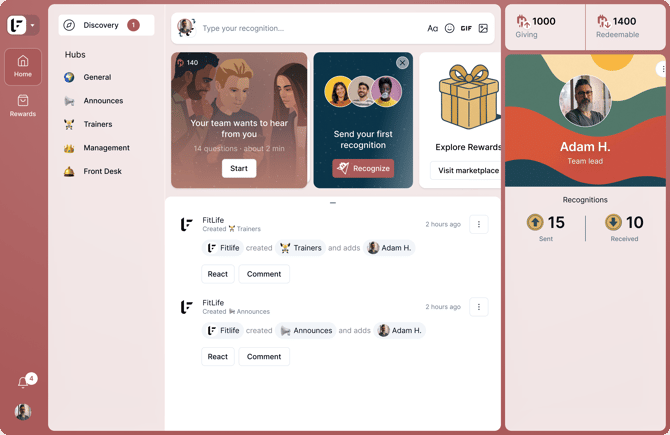
The tile shows:
- The number of questions
- Estimated completion time
- The reward available for completing all survey questions
If you’re included in multiple active survey campaigns, MustardHub combines them into a single survey experience.
Click Start to begin.
Answering a survey
Questions are presented one at a time to help you focus on each response, and either use a binary yes/no response pattern or 1–5 rating scale. Select the option that best reflects your experience or sentiment.
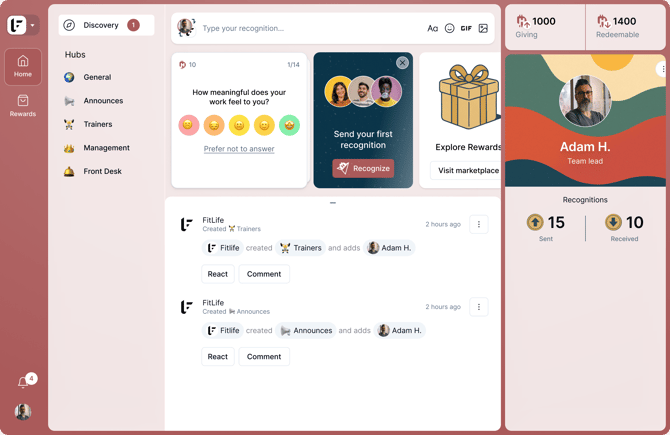
You may choose to skip or not answer a question by selecting Prefer not to answer. Responses marked Prefer not to answer do not earn rewards.
You can return to previous questions and update your responses at any time until all survey questions have been submitted. After completion of the stack, answers can no longer be modified.
Your progress is saved automatically during the course of completing a survey. If you exit your session before finishing the questions, you can return later and continue where you left off.
Finishing a survey
After answering all available questions, you'll see a confirmation screen indicating that your responses have been submitted successfully.
The confirmation screen displays the points earned for your completed survey responses.
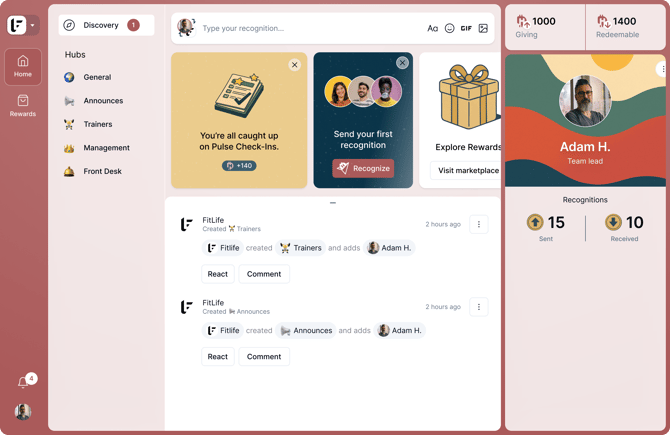
Once your survey is completed, the earned points are automatically transferred to your Redeemable Wallet.
You can review survey rewards and transfers in your wallet activity from your profile settings.
For more information, see Setting up a User Account and Wallets, Transfers & History.
Privacy and visibility
Organizations can review survey trends and overall scores, but they cannot see who submitted a specific response or how an individual answered a question.
Recommended articles
- Surveys (Admin)
Discover how Surveys help collect employee feedback. - Hubs & Hub Settings
Discover how Hub structure shapes what appears in Culture Studio. - Setting up a User Account
Get new Users up and running and see what happens after someone is invited. - Wallets, Transfers & History
Learn how points are recorded and tracked.